Browser-local audio tool

Free Online Pitch Changer for Songs

Change a song's pitch by semitones or cents while tempo stays independent. Preview and loop audio in your browser, then export a WAV—no upload or sign-up.

  • Free to use
  • No sign-up
  • Files stay local

Pitch & tempo workspace

Real-time preview · WAV export

Files stay local

Drop a song here

MP3, WAV, FLAC, M4A, AAC, or OGG up to 80 MB. Audio is decoded and processed in this browser tab.

Nothing is uploaded

Three clear steps

The complete workflow stays on one page. Choose a song, hear each change in context, and create the local copy only after the result works for your voice, instrument, or practice goal.

  1. 1

    Load a song into the pitch changer

    Open an MP3, WAV, FLAC, M4A, AAC, or OGG file up to 80 MB. The pitch changer decodes it in this browser tab, so your audio bytes do not need to travel to an upload server.

  2. 2

    Preview with the pitch changer

    Move pitch by semitones, fine-tune with cents, or change tempo separately. Use the waveform, transport buttons, full-track repeat, or an A–B loop to check the exact section that matters.

  3. 3

    Export the pitch changer result

    Preview the final settings, then render a 16-bit WAV with the same Signalsmith processing configuration used for playback. Download the new copy without changing your original file.

Independent controls

A useful audio pitch changer should tell you what each control will change before you move it. Pitch, cents, and tempo have separate jobs here, while one player handles seeking and repetition.

Semitone control in the pitch changer

The main pitch control runs from -24 to +24 semitones. One semitone is one key on a piano, and 12 semitones equal one octave. Start with -1 or -2 when a song sits slightly too high for your voice, or +1 or +2 when it sits too low. The pitch changer moves the complete mix together and keeps tempo at the value you choose.

Cents control in the pitch changer

Open Fine tune when a recording sounds a little sharp or flat but a full semitone would be too much. There are 100 cents in one semitone; this tool provides a focused -50 to +50 cent range. Small cent changes help align an older recording, backing track, or instrument reference without making an obvious key change.

Tempo control in the pitch changer

Set tempo from 50% to 200% while pitch stays at the selected musical shift. At 80%, the exported track lasts about 1.25 times as long as the original. At 125%, it lasts about 80% as long. This independent tempo changer is useful when you need more time to hear a phrase without moving it into a different key.

Loop controls in the pitch changer

Seek directly on the waveform, jump backward or forward five seconds, repeat the full track, or mark an A–B practice loop. Point B must be at least 0.25 seconds after point A. The same player keeps your position while live pitch and tempo settings update, so you can compare adjustments without rebuilding the workspace.

Practical uses

The best starting setting depends on the job. Each pitch changer workflow connects a common reason for changing song pitch to the exact control, listening check, and limitation you need.

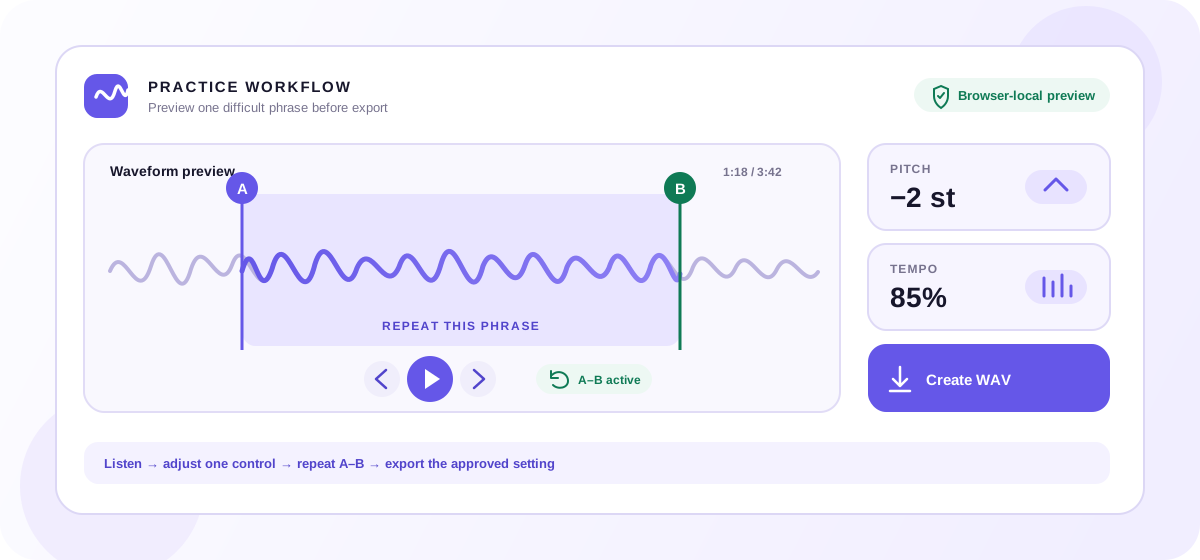
Pitch changer practice workflow with pitch set to minus two semitones, tempo at 85 percent, an A–B waveform loop, and WAV export
A practical pitch changer session: choose a modest key shift, slow the tempo if needed, loop one phrase, and export only after the preview works.

How singers use the pitch changer

Load a backing track and lower or raise it one semitone at a time. Test the verse and the highest part of the chorus before you export. The pitch changer does not detect your vocal range or choose a key for you, which keeps the decision in your ears and avoids presenting an automatic guess as a musical answer.

Practice instruments with the pitch changer

Transpose a reference recording to match a different tuning, capo position, singer, or rehearsal plan. Keep tempo at 100% when you only need a key change. If a passage is difficult, slow the tempo separately and set an A–B loop so the same bars repeat while the selected pitch stays fixed.

Transcribe with the pitch changer

Reduce tempo, place A and B around the phrase, and replay it without repeatedly finding the same timestamp. Fine-tune cents when the source is slightly off your instrument reference. This workflow helps with notes, rhythm, and spoken-word transcription while preserving an independent pitch setting.

Make rehearsal copies with the pitch changer

Create a WAV that reflects the pitch and tempo you approved in the preview. The generated filename records the active adjustment, helping you distinguish rehearsal copies. Keep the original file as your reference; the browser creates a new download and never writes changes back into the source audio.

Know what will change

Pitch describes how high or low sound is perceived. Tempo describes how quickly musical time moves. Traditional playback speed links both together; this tool gives pitch and tempo separate controls so you can choose the relationship.

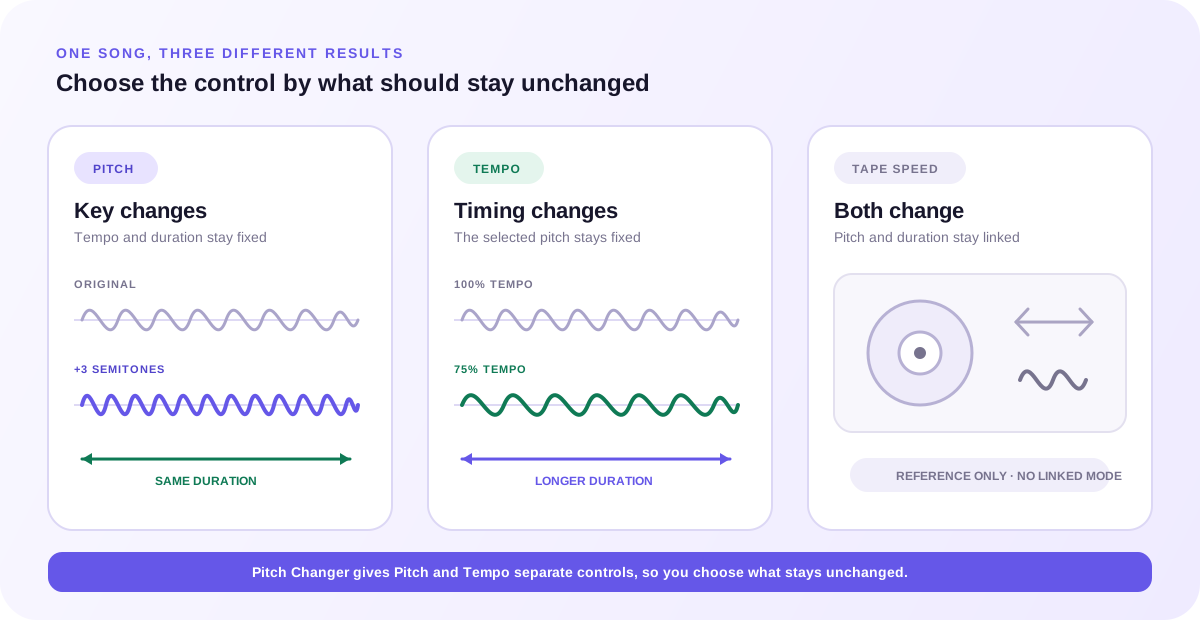
Pitch changer diagram comparing pitch shift with the same duration, tempo change with the same key, and linked tape-style speed
Use Pitch when the key should move, Tempo when timing should move, and both controls when the pitch changer result needs a new key and a new duration.
ControlWhat it changesWhat stays independentBest use
PitchHow high or low the complete recording sounds. A semitone shift transposes tonal material by that musical interval.Tempo and duration stay at the selected tempo setting.Use the pitch changer to change song key for singing, instruments, rehearsal, or a creative high/low effect.
TempoHow quickly the audio progresses and how long the exported track lasts.The chosen pitch shift stays in place instead of following the speed change.Slow a passage for practice or make playback faster without selecting a new musical key.
Tape-style speedSpeed, duration, and pitch move together, like changing the rate of a tape or record.Neither pitch nor tempo is held independent.A linked speed-and-pitch effect. This pitch changer does not expose a linked tape-speed mode.

A quick rule: use Pitch when the song is in the wrong range for your voice or instrument. Use Tempo when the timing is too fast or slow for the task. Change both when you deliberately need a different key and a different duration. The estimated export time beside your file updates as tempo changes.

Quality checklist

Digital pitch shifting reconstructs audio, so quality depends on the source and the size of the change. The live preview in this pitch changer is your fastest quality check because it uses the same engine and settings as the WAV export.

  1. 1

    Begin with the smallest useful shift

    Try one semitone or a modest tempo change, listen to the demanding section, and move farther only when the musical task requires it. Extreme settings ask the processor to reconstruct more audio information and can make artifacts easier to hear.

  2. 2

    Use cents only for fine correction

    A cent is one hundredth of a semitone. If the recording needs a clear key change, use the semitone control first. Reserve cents for small tuning differences so you can understand and reproduce the setting later.

  3. 3

    Check exposed vocals and transients

    Listen to sustained vocal notes, cymbals, consonants, and other detailed moments before export. A full mix can react differently from a simple tone. The A–B loop lets you repeat a revealing section while you compare nearby settings.

  4. 4

    Judge pitch and tempo separately

    Return tempo to 100% while you choose the key, then adjust tempo once the pitch feels right. This two-pass check makes it easier to identify which control introduced an unwanted sound or timing result.

  5. 5

    Keep the original and preview the WAV

    The pitch changer creates a separate WAV and leaves the source untouched. Download the result, play it in the app you plan to use, and keep the original available in case you want to render a smaller shift.

Clear input and output boundaries

Input support, output format, and file privacy describe three different parts of the workflow. Keeping them separate helps you know what the pitch changer can open, what it creates, and where your song is processed.

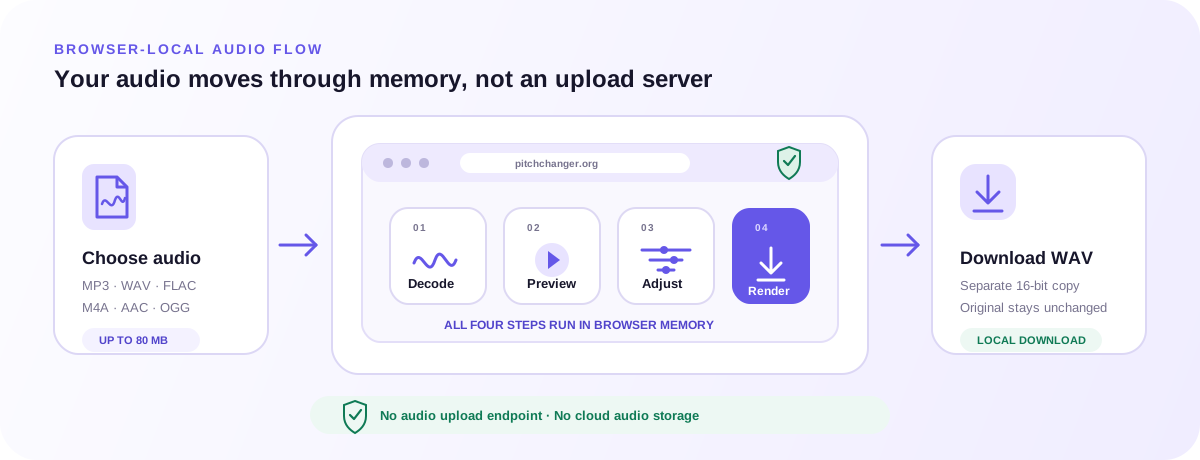
Browser-local pitch changer flow from a selected audio file through decode, preview, adjustment, and render to a local WAV download
The pitch changer decodes, previews, adjusts, and renders audio in browser memory; the only output is the WAV you choose to download.

Input formats for the pitch changer

Select one MP3, WAV, FLAC, M4A, AAC, or OGG file up to 80 MB. The browser supplies the decoder, so codec support can vary. An empty, oversized, unsupported, or undecodable file fails early and leaves you free to choose another file.

WAV output from the pitch changer

Export creates a separate 16-bit WAV. Pitch alone keeps the selected tempo and duration; tempo changes update the output length. WAV files can be larger than compressed inputs. The current pitch changer has no MP3 or multi-format export selector. Create WAV stays disabled until pitch, cents, or tempo differs from the original. Changing a setting after rendering also removes the old download, so it cannot be mistaken for the current preview.

Local processing in the pitch changer

The selected audio is decoded, previewed, and rendered in browser memory. Pitch Changer has no audio upload endpoint in the current service. Closing or reloading the page clears the working session. See the Privacy Policy for the wider site data policy.

FAQ

Quick answers about independent pitch and tempo, supported audio, local processing, export, and the limits you should know before starting.

What is a pitch changer?

A pitch changer raises or lowers the perceived musical pitch of audio. This online pitch changer applies one shift to the complete file, measured in semitones plus optional cents, while its separate tempo control lets you decide whether the track should remain at the original pace.

Can I change pitch without changing speed?

Yes. Leave Tempo at 100% and adjust Pitch or Cents. The rendered duration then stays aligned with the original duration, apart from normal rounding at the audio-frame level. You can also change tempo while keeping your chosen pitch shift in place.

Can I slow a song down without lowering its pitch?

Yes. Set Pitch and Cents to zero, then lower Tempo below 100%. The Signalsmith time-stretch engine changes the playback and export duration while the musical pitch setting stays at the original value.

Is this online pitch changer free?

Yes. The current pitch changer is free to use, has no sign-up, and has no usage-credit or payment step. Choose one supported file up to 80 MB, preview your settings, and create a WAV in the same session.

Does the pitch changer upload my song?

No audio bytes are sent to a Pitch Changer upload endpoint. Your browser reads the selected file, keeps decoded audio in memory, runs live processing, and renders the download locally. Read the Privacy Policy for the wider site data policy.

Which audio files can I open?

The file picker accepts MP3, WAV, FLAC, M4A, AAC, and OGG files up to 80 MB. Actual decoding support comes from your browser and operating system. If the browser cannot decode a selected file, the tool stops and asks you to choose another compatible file.

Which format does the pitch changer export?

The current version exports a 16-bit WAV file. It does not export MP3, M4A, FLAC, AAC, or OGG. WAV keeps the local export path simple and avoids claiming that a compressed input can always be recreated in its original codec.

What is the difference between semitones and cents?

A semitone is the distance between adjacent keys on a piano, and 12 semitones make an octave. One semitone contains 100 cents. Use semitones for a clear transpose and cents for a small sharp-or-flat correction.

Will changing pitch reduce audio quality?

Any time-stretch or pitch-shift process can produce audible artifacts, especially at large settings. This pitch changer uses the same Signalsmith configuration for live preview and offline export and keeps output headroom, but it does not promise lossless or artifact-free results. Preview the hardest section before downloading.

Can this pitch changer detect or choose a song key?

No. The tool changes audio by the semitone and cent values you select; it does not detect the original key, BPM, scale, or vocal range. If you already know a song is in C and want it two semitones higher, for example, select +2 and confirm the result by ear.

Does it change one vocal or instrument separately?

No. The pitch changer processes the complete mixed audio file. It does not separate stems, isolate vocals, correct individual notes, or work like Auto-Tune. Use a prepared backing track or isolated stem when you need one musical part adjusted on its own.
Choose one audio file, listen to the exact section you care about, and export only after the pitch and tempo feel right.

Open the pitch changer